
Good afternoon and welcome to another wonderful installment of BGCNF At Home! Today we’re going to level up our typing speed and accuracy by brushing up on typing basics.
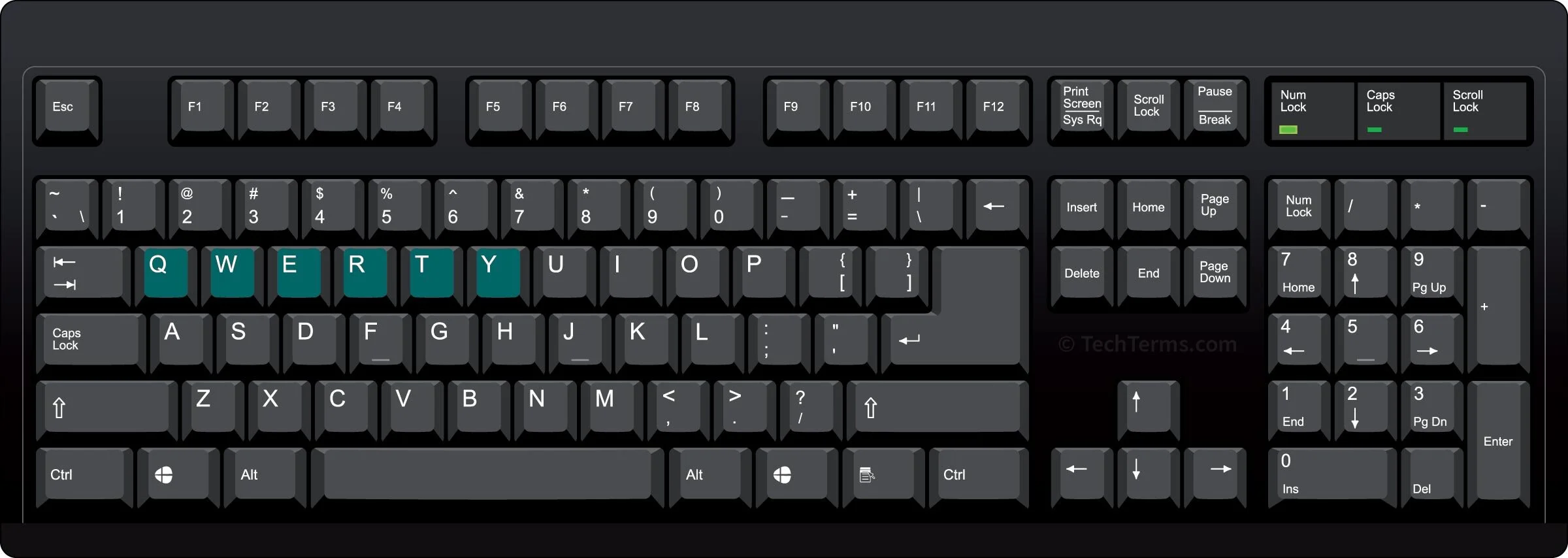
In our digital age, it’s not difficult to find a keyboard – it can be a physical keyboard, the keyboard build-in to a laptop or a software keyboard on a smart device. The point is we’re familiar with the arrangement of the keys and can easily type. However, there was a time when the letter arrangements varied until a popular standard was adopted. The QWERTY keyboard became popular way back in 1878, with the Remington No. 2 typewriter. [1] So let’s brush up on some typing basics!
Talk QWERTY
Let’s begin by looking at your keyboard. When learning, it’s helpful to break down your keyboard into rows. We have the
-
Function key row: F1, F2, F3, etc.
-
Number row: 1,2,3,4,5, etc.
-
Top row: q,w,e,r,t,y, etc.
-
Home row: a,s,d,f,g, ect.
-
Bottom row: z,x,c,v,b, ect.
-
Space bar.
Now let’s warm up with some fun gibberish. Go ahead and open up a word editor and try to make up words using letters across a row. What words do you come up with?
You may come up with words like: QWERTY, UIOP, ASDF, ZXCV or any other combination of letters.
Try to read your made-up words aloud to someone you know. It won’t be easy, but it’ll be fun, and it will help you remember where the letters are on keyboard.
The Home Row
Keyboards have little raised marks on the F and J keys so you’ll know where to place your fingers while you are typing without looking down at the keyboard.
The F and J keys live on HOME ROW. These keys act as anchors for your fingers. What do anchors do? The hold the ship (in other words, your fingers) in place.
The HOME ROW is the first thing you should learn on a keyboard. It contains important letters, like ASDF and GHJKL. Try to remember this letter sequence by saying these letter sequences as words.
Time To Get Typing
Get ready for your first typing tutorial! Go to https://www.typing.com or http://www.typingclub.com/ to learn some basic typing skills. Start with lesson one and follow the directions.
If you already know some basics, look at some of the other typing game activities in this pathway.
Try to practice typing using these tutorials for at least 20 minutes.
Other Typing Tips
There are other important things to learn about your keyboard.
Find the SHIFT, ENTER and SPACE BAR on your keyboard. Do you know what the function of each of these is?
You use the SHIFT key when you want to capitalize a letter you are typing. For example, if you press and hold the shift key as you hit the letter “a” you would type a capital “A.” Try typing some capital and some lowercase letters.
You use the ENTER key when you want to move the cursor to the next line.
Finally, you use the SPACE BAR key anytime you want to make a space between the words you are typing.
Challenge Yourself!
Use the websites above to determine your typing speed and accuracy level. Now that you have a benchmark, work on improving both your accuracy and your speed. Then move on to learning how to type without looking at the keyboard! Happy typing!